
| Press | To Move [on a PC keyboard] |
|---|---|
| Arrow Keys | one adjacent cell |
| Ctrl + Arrow |
If starting in a non-empty cell: to the next empty cell If starting in a empty cell: to the next non-empty cell |
| Tab | Right one column |
| Shift + Tab | Left one column |
| Home | To the first column (A) in the current row |
| Ctrl + Home | To the first cell (A1) in the worksheet |
| Ctrl + End | To the last cell with data in the worksheet |
| Page Up | Up one screen |
| Page Down | Down one screen |
| Ctrl + F | Opens the Find dialog box where you can search for specific data |
Although it is best to view the EPHS index on a large screen, one can navigate on a
small smartphone screen using the "find" portion of "find and replace".
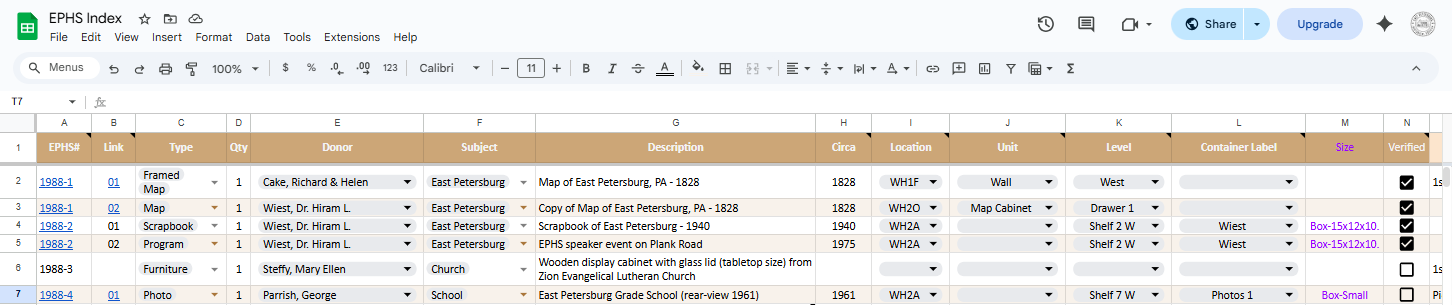
| Field | Value |
|---|---|
| EPHS# |
East Petersburg Historical Society Record (Index) Number If the number is a link, hover over it, then position your curser over the image of the folder that appears just below and left-click. This will show you a Google Drive folder view of files in the record. You can change the list appearace from file name to image in the upper right; double click a file or image to open it. |
| Link |
Individual file within the record If the number is a link, hover over it to see the content, then position your curser over the content that appears just below and left-click to open the file |
| Type | Identifies the general category, reflecting its primary documentary or physical format |
| Qty | Quantity, sometimes, but seldomly, duplicates |
| Donor | Person(s) or organization who gifted the item |
| Subject |
Categorizes the item by its main historical topic, place, or activity,
such as education, transportation, local history, social life... Type = what kind of object it is; Subject = what it’s about |
| Description |
Briefly explains what the item is, what it depicts or contains,
and any distinguishing features or context not captured elsewhere - answers one or more of: What is it? What does it show or contain? Why is it notable? |
| Circa | Associated year (if a range of years, the earliest) |
| Location |
Room designation within the Wolf House (WH) Museum 1 = 1st Level, 2 = 2nd Level (upstairs), 4 = 3rd Level (attic), B = Basement, G = Garage, F = Front (gift shop), D = Dining (middle) room, K = Kitchen, O = Office (upstairs front room), C = Closet, L = Library (upstairs middle room), A = Archive (upstairs back room), WC = Water Closet |
| Unit | Identifies the specific storage furniture or display piece where the item is physically or digitally housed |
| Level | Shelf # or Drawer # or compass direction |
| Container Label | Content indicator; Note that a container may be shared, but not have more than one label |
| Size | General dimensions of the container |
| Verified | Checked if the item has been seen in its place in recent times |
| (original) Container Label | prior to 2025 |
| old-Location | prior to 2025 |
| old-Size | prior to 2025 |